AI Game Makers Are Getting Scary Good: Here’s What You Can Build Today

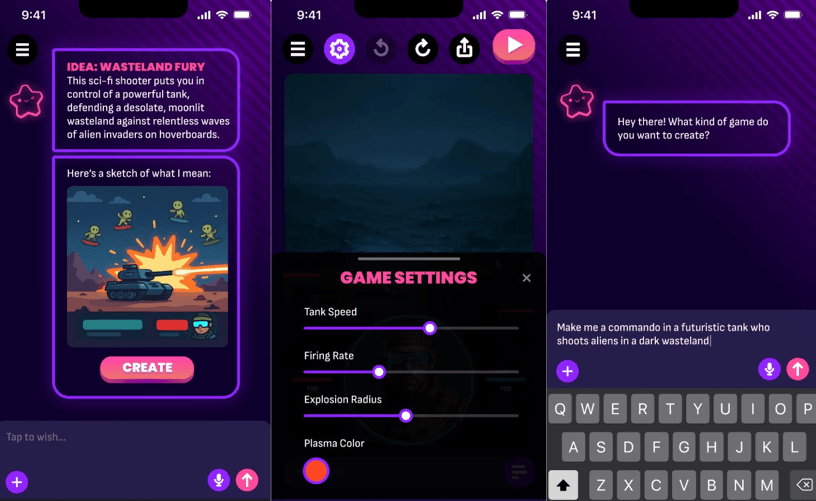
AI game makers have moved far beyond simple idea generators. In 2026, creators can describe a mechanic in plain English, receive a playable prototype, test it immediately, and continue improving it through follow-up instructions.
That does not mean AI can create a perfect commercial game without supervision. The first version may still have weak level design, confusing controls, repetitive content, or technical issues. However, the time between having an idea and testing it has become dramatically shorter.
A person who has never used a traditional game engine can now experiment with platformers, racing games, puzzle games, shooters, survival challenges, physics games, and other small projects without writing every line of code manually.
The real opportunity is not simply generating games faster. It is allowing more people to test ideas that might never have become playable before.
What makes modern AI game makers different?
Traditional game development usually requires several separate skills. A creator may need to understand programming, game engines, 2D or 3D art, animation, level design, sound, user interfaces, testing, and publishing.
AI game maker bring some of these tasks into a single workflow.
A typical process looks like this:
- Describe the game in plain language.
- Let the AI create the first playable version.
- Test the main mechanic.
- Ask for specific changes.
- Improve the controls and difficulty.
- Add content after the core loop works.
- Share or export the project.
Several current platforms publicly describe this prompt-to-playable workflow. For example, Instaplay focuses on generating playable browser games from written prompts, while Aicade presents a system that can generate game elements such as art, code, levels, and sound.
The important difference is that AI is no longer limited to answering questions about game development. In some tools, it can participate directly in creating and changing the playable project.
What can you build with AI today?
The best results usually come from games with a clear central mechanic. AI tools can produce more convincing prototypes when the player’s action and goal are easy to describe.
1. Arcade games
Arcade games are a strong starting point because they usually have simple controls and short gameplay loops.
You could create:
- A game where players avoid falling objects
- A score-based shooting challenge
- A reaction game based on timing
- A lane-switching runner
- A game where players collect items before time runs out
These projects are useful for learning because the creator can focus on one interaction and quickly see whether it feels responsive.
2. Platformers
AI can help create basic jumping, platforms, hazards, checkpoints, and level progression.
A beginner prompt might be:
Create a 2D platformer where a small robot jumps across floating platforms, collects batteries, avoids spikes, and reaches a charging station at the end of each level.
The first version may be simple, but it gives the creator something to test. You can then ask for higher platforms, moving obstacles, better checkpoints, or a gradual difficulty curve.
3. Racing games
Racing concepts are also suitable for AI-assisted prototyping. A creator can describe a vehicle, track, camera view, obstacles, speed system, and win condition.
Possible ideas include:
- A time-trial racing game
- A drifting challenge
- A traffic-dodging game
- A delivery race
- A futuristic hover vehicle game
The difficult part is not generating a track. It is making movement feel enjoyable. Steering, acceleration, camera position, and collision behavior need careful testing.
4. Puzzle games
Puzzle games can be built around rules that are easy to explain.
Examples include:
- Matching colors
- Connecting paths
- Moving blocks into specific positions
- Solving a timed logic challenge
- Choosing the correct sequence of actions
AI can help generate different puzzle layouts, but the creator must check whether the puzzles are actually solvable and whether the difficulty increases fairly.
5. Physics-based games
Physics games are especially interesting because unexpected movement can create funny or surprising moments.
You might build:
- A character-launching challenge
- A stacking game
- A vehicle-balancing game
- A destruction sandbox
- A slingshot battle
- A game based on swinging, bouncing, or rolling
These games can be entertaining even when the physics are slightly unpredictable, but the controls still need to feel understandable. Players should lose because of a decision or mistake, not because the system behaves randomly.
6. Endless progression games
AI can also help create simple games based on repeated improvement.
A progression loop might include:
- Completing short challenges
- Collecting coins
- Unlocking cosmetic items
- Increasing movement speed
- Improving abilities
- Reaching a farther distance
- Attempting a higher score
These systems are easy to understand, but creators need to avoid making the game repetitive. New obstacles, decisions, or strategies should appear as the player improves.
A speed-based obstacle example
Speed Per Step is described as a fast-paced 3D obstacle course where the character becomes faster with every step. Players race across disappearing platforms, collect coins, unlock pets, and work toward reaching 10,000 meters.
For a creator, this concept demonstrates how one unusual rule can shape the entire game. The speed increase is not just a reward. It changes how the player approaches every platform because movement becomes more difficult over time.
A small AI-generated prototype could begin with:
- One short obstacle course
- A character with automatic forward movement
- A speed increase after each step
- Disappearing platforms
- A visible distance counter
- One collectible type
- A restart option
After the core mechanic feels good, the creator could add pets, new platform patterns, checkpoints, environmental changes, and longer challenges.
The supplied summary explains the gameplay concept, but it does not confirm the development tools used to create the game. It should therefore be used as a design example, not as proof of a particular AI production process.
The best AI game maker depends on your goal
Different platforms are useful for different stages of creation.
For quick browser prototypes
Instaplay is positioned around prompt-based browser games that can be created, tested, and shared without installing a traditional engine. This makes that type of tool useful for creators who want to test an idea quickly or send a playable concept to someone else.
For instant experimentation
Aicade focuses on turning written ideas into playable games while helping with elements such as art, levels, code, and sound. This approach is suitable for creators who want to test several game concepts before deciding which one deserves more work.
For more flexible editing
Vibecade says it supports both natural-language creation and deeper editing through its project workflow. Its public information also describes options for sharing, auto-saving, source editing, and exporting to additional platforms.
This type of tool may be better for creators who want AI assistance but do not want to remain completely dependent on prompts.
For exporting projects
Exekite publicly promotes web, desktop, and mobile export options, along with project and source-code ownership. Those claims should always be checked against the current terms before a creator begins a commercial project.
Export matters when you want your project to exist outside the original platform. A prototype that can only be played inside one tool may not be suitable for a long-term release.
For mobile-first creation
Mobile-oriented tools can help creators who do not have access to a powerful computer. Gummy, for example, describes a workflow where users can generate playable games from a phone or tablet.
A mobile workflow can be convenient for small games, but always check whether it supports the level of control and visual complexity you need.
How to write prompts that produce better games
AI game makers respond best to specific instructions. A vague prompt may create something that technically works but does not match your idea.
Weak prompt:
Make a fun obstacle game.
Stronger prompt:
Create a 3D obstacle course where the player automatically moves forward across floating platforms. The character becomes slightly faster after each successful step. Some platforms disappear after being touched. Add coins along safer routes, but place a few risky shortcuts for advanced players. Include a distance counter, a restart button, and three short stages. Keep the first stage easy enough for new players to learn the movement.
The stronger version explains:
- The camera and general format
- The main movement
- The progression rule
- The main hazard
- The reward
- The level structure
- The user interface
- The intended difficulty
You do not need to use complicated technical language. You need to explain the player experience clearly.
Build the core loop before adding more features
The core loop is the repeated sequence of actions that makes the game enjoyable.
For an obstacle game, the loop might be:
- Move forward.
- Choose a safe or risky path.
- Avoid a hazard.
- Collect a reward.
- Travel farther.
- Attempt another run after failure.
Before adding pets, skins, achievements, shops, or multiple worlds, test whether this basic loop is fun.
Ask yourself:
- Does the player understand what to do?
- Do the controls respond quickly?
- Is failure fair?
- Does the challenge increase gradually?
- Is success satisfying?
- Is there a reason to try again?
If the answer is no, more content will not solve the main problem.
Ask for focused changes
One of the biggest mistakes new creators make is asking AI to change too many things at once.
Instead of writing:
Add ten levels, new enemies, pets, online multiplayer, better graphics, a shop, achievements, music, and a story.
Use smaller requests:
- Make the first level easier without changing the controls.
- Add two new platform patterns after the first checkpoint.
- Add a distance counter at the top of the screen.
- Give the player a short warning before a platform disappears.
- Add a cosmetic reward after three successful runs.
- Keep the current speed system but reduce the late-game difficulty.
Focused changes make it easier to see what improved and what broke.
What AI still struggles with
AI game makers are impressive, but they do not remove the need for design judgment.
Common weaknesses include:
Repetitive levels
An AI may create many levels that look different but play exactly the same way.
Unfair difficulty
A small change in speed, enemy timing, or platform placement can make a game frustrating.
Confusing interfaces
A prototype may have buttons or menus that are technically present but not clearly explained.
Broken progression
Rewards may appear too frequently, too rarely, or without meaningful purpose.
Inconsistent visuals
Generated assets may not share the same proportions, lighting, or art style.
Technical bugs
Controls, collision detection, saving, sound, and mobile layouts all need testing.
The solution is not to stop using AI. It is to test each feature and improve the game with clear instructions.
Important checks before publishing
Before sharing an AI-generated game, review:
- Ownership of code and assets
- Commercial-use rights
- Export options
- Platform fees
- Account requirements
- Storage and hosting limits
- Multiplayer support
- Player data collection
- Moderation tools
- Mobile compatibility
- Accessibility features
- Performance on slower devices
Terms and features can change quickly, especially in a new category. Read the current documentation instead of relying on an old review or social media post.
How Astrocade fits into this changing creator landscape
Astrocade presents game creation as part of the same environment where people discover and play online games. Its creator-focused material shows how a written concept can be used to generate a playable experience, which makes it easier for beginners to move from idea to prototype.
The most valuable part of this workflow is the short feedback cycle. A creator can describe an idea, test it, notice what feels wrong, and request an adjustment. That process encourages experimentation because failure is cheaper and faster.
A creator does not need to begin with a perfect business plan. Start with a mechanic that is easy to explain, build a small version, and see whether players understand and enjoy it.
See also: How Acquaint Builds Construction Management Software: ERP, DPR, and Sales Modules
Why human creativity still matters
AI can produce a playable result, but it does not automatically know why a player should care.
The creator still decides:
- What makes the game different
- Which audience should play it
- How difficult it should become
- What emotions it should create
- Whether the reward system feels meaningful
- Which ideas should be removed
- When the game is ready to publish
The strongest AI-assisted games will not come from the longest prompts. They will come from creators who understand what they want the player to feel.
AI makes production faster. It does not replace taste, observation, or responsibility.